
Why Use AI to Create Digital Products?

Creating digital products used to require a mix of design skills, expensive software, and plenty of time. Today, artificial intelligence has changed that process dramatically. Whether you want to sell printable wall art, digital planners, coloring pages, social media templates, workbooks, or other downloadable products, AI can help you turn an idea into a polished digital product faster and more efficiently.
But there is an important distinction: successful AI-assisted digital products are not created by simply typing a prompt and uploading the result. The best products combine AI with human creativity, thoughtful design, market research, editing, quality control, and a clear understanding of what customers actually want.
In this guide, you’ll learn how to create stunning digital products using AI, from finding profitable ideas and generating content to designing, refining, packaging, and selling your finished products.
Why Use AI to Create Digital Products?
AI can dramatically reduce the time required to move from an idea to a finished product.
Instead of spending hours starting from a blank canvas, you can use AI to brainstorm concepts, create initial designs, generate written content, develop product variations, and automate repetitive tasks.
For example, a creator developing a digital planner could use AI to:
- Brainstorm planner themes and layouts
- Generate productivity prompts
- Create habit-tracking ideas
- Develop page structures
- Suggest typography and color combinations
- Write product descriptions
- Generate marketing content
The biggest advantage isn’t simply speed. AI gives creators more room to experiment.
You can test several product concepts, create variations for different audiences, and improve your designs without rebuilding everything from scratch.

What Types of Digital Products Can You Create With AI?
AI can support a surprisingly wide range of digital products.
Some popular categories include:
| Digital Product | How AI Can Help | Human Input Needed |
| Printable wall art | Image concepts and variations | Composition, editing, originality |
| Digital planners | Page ideas and content | Layout and usability |
| Coloring books | Illustration concepts | Line quality and formatting |
| Social media templates | Content and design ideas | Branding and visual consistency |
| Ebooks | Research and outlining | Fact-checking and editing |
| Worksheets | Exercises and prompts | Accuracy and educational value |
| Journals | Writing prompts and themes | Structure and audience research |
| Invitations | Design concepts and wording | Final design and personalization |
| Presentation templates | Layout and content ideas | Visual hierarchy and usability |
The strongest opportunities usually come from combining AI capabilities with a specific audience or niche.
Instead of creating a generic “daily planner,” for example, consider a minimalist digital planner for freelance designers. Specific products are easier to position, market, and differentiate.

Step 1: Find a Profitable Digital Product Idea
Before opening an AI tool, start with the customer.
One of the most common mistakes new creators make is creating something they personally like without checking whether people actually want it.
Start by asking:
- Who is the product for?
- What problem does it solve?
- Why would someone pay for it?
- What existing products are popular?
- Can you make the product more useful or attractive?
- What makes your version different?
Research Your Niche
Look at marketplaces, social platforms, search results, and competitor products to identify patterns.
Pay attention to:
- Frequently purchased product types
- Popular themes
- Common customer complaints
- Frequently requested features
- Product gaps
- Visual styles that appear repeatedly
Don’t simply copy popular products. Instead, identify what customers like and what existing products fail to provide.
That gap can become your opportunity.
Use AI for Product Brainstorming
AI can help generate dozens of ideas quickly.
For example, instead of asking:
“Give me digital product ideas.”
Try something more specific:
“Generate 20 digital product ideas for busy freelance designers. Focus on products that solve practical workflow, productivity, and organization problems.”
The second prompt gives the AI a defined audience, problem, and commercial direction.
Step 2: Validate Your Idea Before Designing
A beautiful product isn’t necessarily a profitable product.
Before investing significant time, validate the concept.
Search for related products and examine:
- Number of competing products
- Customer reviews
- Pricing patterns
- Common complaints
- Product formats
- Features customers repeatedly mention
Reviews are particularly valuable because they reveal what buyers actually want.
For example, if customers repeatedly complain that a planner has “too many decorative pages but not enough useful planning space,” you have a clear opportunity to create a more practical alternative.
Use AI to analyze ideas, but don’t let AI replace market research.
Step 3: Develop the Product With AI
Once your idea is validated, create a clear product structure.
For a digital planner, this might include:
- Cover page
- Yearly overview
- Monthly calendar
- Weekly planning pages
- Daily planning pages
- Goal tracker
- Habit tracker
- Budget tracker
- Notes pages
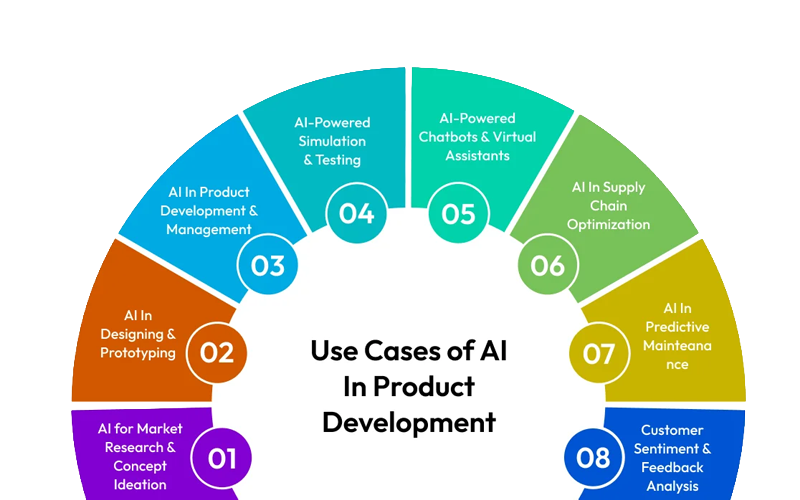
AI can help you determine what sections might be useful, but you should evaluate every page from the customer’s perspective.
Ask yourself:
“Would someone actually use this?”
If the answer is no, remove it.
A smaller, useful product is often better than a large product filled with unnecessary pages.
Step 4: Create Better AI Prompts
The quality of AI output depends heavily on the quality of your instructions.
A vague prompt might produce generic results. A detailed prompt gives you greater control.
Instead of:
“Create minimalist wall art.”
Try:
“Create a minimalist botanical wall art concept for a modern neutral living room. Use a simple editorial composition, subtle organic shapes, balanced negative space, sophisticated typography, and a calm contemporary aesthetic. The design should work as printable home decor.”
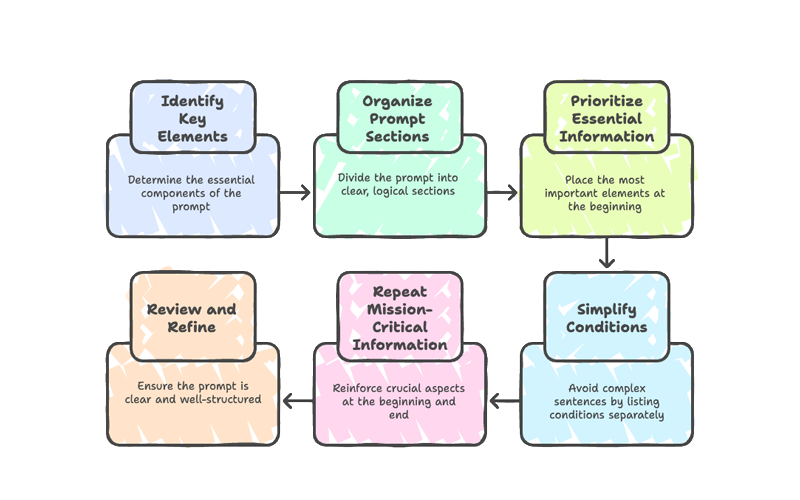
A useful AI prompt often specifies:
- Subject
- Audience
- Style
- Composition
- Mood
- Color direction
- Format
- Intended use
- Important exclusions
Build a Prompt Library
If you’re creating multiple products, keep successful prompts in an organized library.
Record:
- Prompt
- AI tool used
- Output format
- Settings
- What worked
- What failed
- Final modifications
This turns random experimentation into a repeatable workflow.
Step 5: Combine AI With Human Design
This is where many AI-generated products fall short.
Raw AI output often contains problems such as:
- Poor typography
- Incorrect text
- Inconsistent spacing
- Strange visual details
- Repetitive compositions
- Incorrect proportions
- Weak hierarchy
- Generic aesthetics
Don’t treat the first AI generation as the final product.
Instead, use AI for ideation and production assistance, then use human design judgment to refine the result.

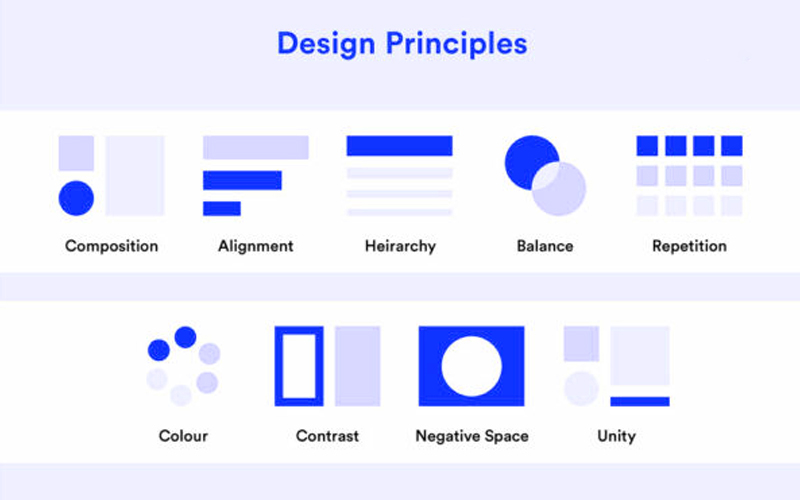
Apply Basic Design Principles
Even beginners can dramatically improve AI-generated designs by focusing on:
Hierarchy: Make the most important information visually dominant.
Alignment: Keep elements organized along consistent visual lines.
Contrast: Make important elements easy to distinguish.
Spacing: Give content enough breathing room.
Consistency: Use a coherent visual language across the entire product.
Balance: Avoid making one side of the composition unnecessarily heavy.
A simple design with excellent spacing can look more professional than a complicated design packed with decorative elements.
Step 6: Create Multiple Product Variations
One strong concept can become an entire product collection.
For example, a successful wall art concept could be adapted into:
- Beige minimalist version
- Black-and-white version
- Botanical version
- Abstract version
- Typography version
- Bedroom collection
- Living room collection
Similarly, one digital planner framework could become versions for:
- Students
- Entrepreneurs
- Freelancers
- Teachers
- Content creators
- Small business owners
This approach allows you to build a product line rather than relying on a single listing.
Step 7: Improve AI-Generated Images
If you’re creating AI artwork, quality control is essential.
Inspect every image carefully before publishing.
Look for:
- Distorted objects
- Strange hands or faces
- Unnatural shadows
- Repeated elements
- Broken typography
- Unwanted artifacts
- Poor image resolution
- Cropped subjects
- Inconsistent styles
For printable products, also consider the final print size and resolution.
A design that looks attractive on a phone screen may not look good when printed as a large wall poster.
Use Image Editing for the Final Polish
AI generation should often be followed by traditional editing.
You may need to:
- Remove unwanted objects
- Correct colors
- Adjust exposure
- Clean edges
- Improve sharpness
- Fix typography
- Resize the artwork
- Create multiple aspect ratios
This human editing stage can make the difference between an experimental AI image and a professional digital product.
Step 8: Design for the Customer’s Real Use Case
Always design around how the buyer will actually use your product.
For example, a printable planner should be:
- Easy to print
- Easy to read
- Simple to write on
- Properly aligned
- Available in appropriate page sizes
- Clearly organized
A digital wall art product should include appropriate dimensions and file formats for its intended printing applications.
Think beyond aesthetics.
A successful digital product should be beautiful and functional.
Step 9: Create a Professional Product Package
Your product isn’t finished when the design is complete.
You also need to package it professionally.
Depending on the product, your package may include:
- Main product files
- Different sizes
- Different formats
- Printing instructions
- Usage instructions
- Quick-start guide
- License information
- Bonus files
For example, a printable artwork bundle could include multiple common aspect ratios so customers can print the artwork in different frame sizes.
Clear file names also improve the customer experience.
Instead of:
final2-new-revised-last.pdf
use:
Minimalist_Botanical_Print_16x20.pdf
Professional organization builds trust.
AI Tools vs Human Creativity
AI is powerful, but it works best as a creative assistant rather than a complete replacement for human judgment.
| Task | AI Strength | Human Strength |
| Brainstorming | Excellent | Excellent |
| Idea generation | Excellent | Excellent |
| Repetitive content | Excellent | Moderate |
| Market understanding | Limited | Strong |
| Brand strategy | Limited | Strong |
| Visual judgment | Improving | Strong |
| Fact checking | Requires verification | Strong |
| Final quality control | Limited | Essential |
| Original creative direction | Supportive | Essential |
The most effective workflow is therefore AI-assisted, human-directed.
Let AI handle repetitive and exploratory work while you control the creative vision and final decisions.
Common Mistakes When Creating AI Digital Products
Publishing the First AI Output
The first result is rarely the best result.
Generate multiple concepts and refine the strongest one.
Ignoring Copyright and Usage Rights
Don’t assume every AI-generated asset is automatically safe for commercial use.
Before selling a product, understand the terms of the AI tools, fonts, stock assets, templates, and other resources you’re using.
Keep records of important licenses and source assets.
Creating Generic Products
“Planner” is a category, not a strong product strategy.
A focused product for a clearly defined customer is easier to market.
Overdesigning
Adding more graphics, fonts, colors, and decorative elements doesn’t automatically make a product better.
Professional design often depends on restraint.
Skipping Quality Control
Always test your files before selling them.
Print sample pages when appropriate. Open every file. Check dimensions. Verify text. Inspect images at full resolution.
Depending Completely on AI
AI can generate ideas and content, but it doesn’t automatically understand your customers, your brand, or your quality standards.
Your expertise is what turns AI output into a valuable product.
How to Make AI Digital Products More Valuable
If you want your products to stand out, focus on the customer experience, not just the number of files included.
Consider adding:
- Multiple formats
- Different sizes
- Helpful instructions
- Bonus templates
- Editable versions
- Practical examples
- Consistent branding
- Simple organization
For example, instead of selling 50 generic planner pages, create 25 carefully designed pages that solve specific planning problems.
Value comes from usefulness, not file count.
How AI Can Speed Up Your Digital Product Workflow
A practical AI-assisted workflow might look like this:
- Research — Identify a customer problem.
- Validate — Check demand and competition.
- Plan — Define the product structure.
- Brainstorm — Use AI to generate concepts.
- Create — Develop initial designs or content.
- Edit — Refine everything manually.
- Test — Check usability and technical quality.
- Package — Organize files and instructions.
- Create listings — Write titles, descriptions, and promotional content.
- Launch — Publish and collect customer feedback.
- Improve — Update the product based on real-world use.
This process is much more reliable than simply generating AI images and uploading them immediately.
How to Optimize Digital Products for Search
If you plan to sell your products online, SEO matters.
Use relevant keywords naturally in:
- Product titles
- Descriptions
- Product categories
- Image alt text where supported
- Blog content
- Collection pages
- Supporting educational content
Focus on search intent rather than keyword repetition.
For example, someone searching for “printable minimalist wall art” has a different intent from someone searching for “how to make printable wall art.”
Understanding that distinction helps you create both better products and better content.
FAQ: Creating Digital Products With AI
Can I create digital products with AI without design experience?
Yes. Beginners can use AI to brainstorm ideas, generate starting points, organize content, and explore visual concepts. However, learning basic design principles and editing skills will significantly improve the final result.
What digital products can I sell using AI?
You can create many types of digital products, including printable wall art, planners, journals, worksheets, coloring pages, templates, ebooks, invitations, educational resources, and business templates. Always check the commercial-use terms of the tools and assets involved.
Is it legal to sell AI-generated digital products?
It depends on the AI tool, the content you create, and the laws and platform policies that apply to your situation. Review the specific tool’s commercial-use terms and avoid incorporating copyrighted or trademarked material without appropriate rights.
How do I make AI-generated products look professional?
Don’t publish raw AI output. Refine typography, spacing, composition, colors, resolution, file formats, and consistency. Test the finished product from the customer’s perspective before selling it.
What is the best AI tool for creating digital products?
There isn’t one universal best tool. The right choice depends on the product you’re creating. Image generators can help with artwork, language models can assist with research and writing, and design platforms can help assemble and format the final product.
How can I make my AI digital products different from competitors?
Start with a specific audience and solve a specific problem. Develop a recognizable visual style, improve usability, offer useful variations, and pay attention to customer feedback. Your creative direction and product strategy can become your strongest differentiators.
Can AI completely automate a digital product business?
AI can automate or accelerate many repetitive tasks, but completely removing human involvement is risky. Market research, creative direction, quality control, legal considerations, customer understanding, and product strategy still require human judgment.
Conclusion
Learning how to create stunning digital products using AI isn’t about letting artificial intelligence do everything for you. It’s about using AI strategically to turn good ideas into useful, polished, and marketable products more efficiently.
Start with a real customer need. Research the market before designing. Use AI to brainstorm and accelerate production, but refine the results with human creativity and quality control. Test your files, package them professionally, and continually improve based on customer feedback.
Most importantly, don’t compete by producing the largest number of AI-generated files. Compete through better ideas, stronger design, greater usefulness, and a better customer experience.
Whether you’re interested in printable wall art, digital planners, coloring books, templates, or other downloadable products, AI can become a powerful part of your creative workflow.
Explore your ideas, experiment with different formats, and build products that people genuinely want to use. With the right combination of AI technology and human creativity, your next digital product could be the beginning of an entire product collection.