
How Can AI Tools Help in Design? A Complete Guide for Modern Designers

Artificial intelligence (AI) is changing the way designers create, edit, and deliver visual content. From generating creative ideas to removing backgrounds, creating layouts, improving images, and automating repetitive tasks, AI design tools can help designers work faster while maintaining a high level of creativity and quality.
For graphic designers, web designers, e-commerce businesses, marketers, photographers, and content creators, AI can become a valuable part of the creative workflow. Instead of replacing the designer, AI can assist with time-consuming tasks and provide new ways to explore ideas.
In this guide, we will explain how AI tools can help with design, the benefits of AI in graphic design, common AI design applications, limitations to consider, and practical ways to combine AI with human creativity.
What Are AI Design Tools?
AI design tools are software applications that use artificial intelligence, machine learning, computer vision, or generative AI to assist with creative and design-related tasks.
These tools can understand images, recognize objects, generate visual concepts, suggest layouts, improve photographs, create graphics, and automate repetitive editing processes.
Depending on the tool, AI can help with tasks such as:
- Generating design ideas
- Creating images from text prompts
- Removing image backgrounds
- Retouching photographs
- Object removal
- Image enhancement
- Creating social media graphics
- Generating color palettes
- Suggesting typography combinations
- Creating website layouts
- Producing marketing visuals
- Resizing designs for different platforms
- Creating product images
- Automating repetitive editing tasks
The most useful approach is to think of AI as a design assistant. The designer remains responsible for the creative direction, brand identity, visual quality, and final decision-making.
How Can AI Tools Help With Design?
AI tools can support almost every stage of the design process. They can be particularly useful during research, ideation, production, editing, and optimization.
Let’s look at the major ways AI can help designers.
1. AI Can Generate Design Ideas
One of the biggest challenges for designers is starting a project.
You may have a client brief but struggle to decide on the right visual direction. AI can help generate initial ideas quickly.
For example, a designer working on an e-commerce campaign might ask an AI tool to suggest concepts for:
- Product advertisements
- Social media posts
- Website banners
- Promotional graphics
- Product presentation
- Email marketing visuals
AI-generated concepts can provide different creative directions that designers can evaluate and develop.
However, AI-generated ideas should generally be treated as a starting point rather than a finished design. A professional designer can refine the concept to make it appropriate for the brand, audience, and project requirements.
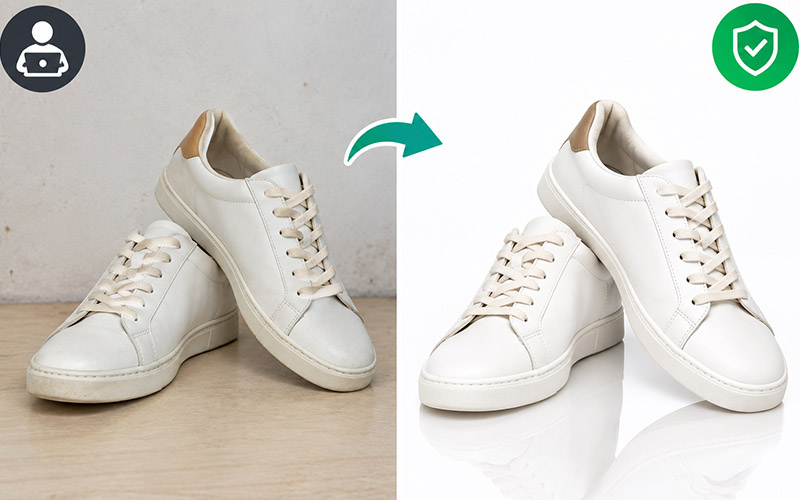
2. AI Can Speed Up Background Removal
Background removal is a common task in product photography and e-commerce image editing.
Traditionally, designers might use selection tools, clipping paths, masks, or other manual techniques to separate a product from its background.
AI-powered background removal tools can automatically detect the main subject and separate it from the surrounding environment.
This can be especially helpful for:
- E-commerce product photos
- Fashion photography
- Jewelry images
- Furniture photography
- Amazon product images
- Social media graphics
- Catalog images
- Advertising materials
AI can dramatically reduce the time required for simple background removal.
For complex images involving hair, transparent objects, fur, shadows, or fine details, professional manual editing may still be necessary.
3. AI Can Help With Image Retouching
Professional image retouching can involve many repetitive tasks.
AI tools can assist with:
- Removing small imperfections
- Cleaning backgrounds
- Reducing unwanted objects
- Improving image sharpness
- Adjusting lighting
- Enhancing details
- Correcting certain image problems
For example, a product photographer may have an image containing dust, scratches, or unwanted elements. AI-assisted editing can help identify and remove some of these imperfections.
The designer can then review the result and make manual adjustments where necessary.
This combination of automation and human quality control can create a more efficient workflow.
4. AI Can Generate Images From Text
Generative AI has introduced a new way to create visual concepts.
Instead of starting with a blank canvas, designers can describe an idea using natural language.
For example:
“Create a modern product advertising scene with a luxury perfume bottle on a clean studio background, soft lighting, and premium commercial photography.”
An AI image-generation tool can produce visual concepts based on the description.
This can be useful for:
- Concept development
- Mood boards
- Advertising ideas
- Creative presentations
- Social media concepts
- Storyboards
- Background creation
- Marketing campaigns
Designers can then use these concepts as inspiration or incorporate suitable AI-generated elements into a larger design workflow.
5. AI Can Help Create Multiple Design Variations
Creating multiple versions of a design can take considerable time.
Suppose a business needs the same advertisement in several formats:
- Instagram post
- Instagram story
- Facebook advertisement
- Website banner
- Mobile advertisement
- Email banner
AI-assisted design software can help adapt content to different formats.
This allows designers to spend less time performing repetitive resizing and more time working on creative decisions.
For businesses producing large volumes of marketing content, this can significantly improve production efficiency.
6. AI Can Help With Color Selection
Choosing an effective color palette is an important part of visual design.
AI-powered design tools can analyze existing visuals or generate color suggestions based on a particular style.
For example, a designer working on a technology brand may want a palette that communicates:
- Innovation
- Trust
- Modernity
- Simplicity
AI can suggest combinations that the designer can evaluate and modify.
AI color suggestions can be particularly useful during the early stages of branding, website design, presentation design, and marketing projects.
However, designers should consider accessibility, brand guidelines, cultural context, and contrast rather than relying solely on automated recommendations.
7. AI Can Help With Typography
Typography strongly influences how a design feels.
A professional design may require a combination of:
- Headline fonts
- Body fonts
- Display fonts
- Supporting typography
AI-assisted tools can help designers explore typography combinations and identify styles that may work together.
For example, a designer creating a luxury fashion website may ask for elegant typography suggestions, while a technology startup may require a clean and modern typographic system.
AI can speed up exploration, but the final selection should consider readability, hierarchy, brand personality, and usability.
AI Tools for Graphic Design
AI is increasingly integrated into graphic design workflows.
Graphic designers can use AI to assist with:
- Logo concepts
- Posters
- Flyers
- Brochures
- Social media graphics
- Advertisements
- Presentations
- Infographics
- Product promotions
- Marketing materials
AI can help create an initial concept, but professional design still requires careful attention to composition, spacing, hierarchy, alignment, typography, and brand consistency.
The strongest workflow often combines AI-generated ideas with human design expertise.
AI for E-Commerce Product Image Design
E-commerce is one area where AI-powered image editing can be particularly useful.
Online shoppers cannot physically examine products before purchasing. Product images therefore play an important role in presenting information and creating a professional shopping experience.
AI can assist e-commerce businesses with:
- Background removal
- Product isolation
- Image cleanup
- Object removal
- Image enhancement
- Background replacement
- Shadow creation
- Image resizing
- Product image variations
For businesses managing hundreds or thousands of products, automation can reduce repetitive editing work.
However, consistency is extremely important. Product images should maintain accurate colors, proportions, textures, and product details.
AI should therefore be used with quality control rather than blindly applying automated edits.
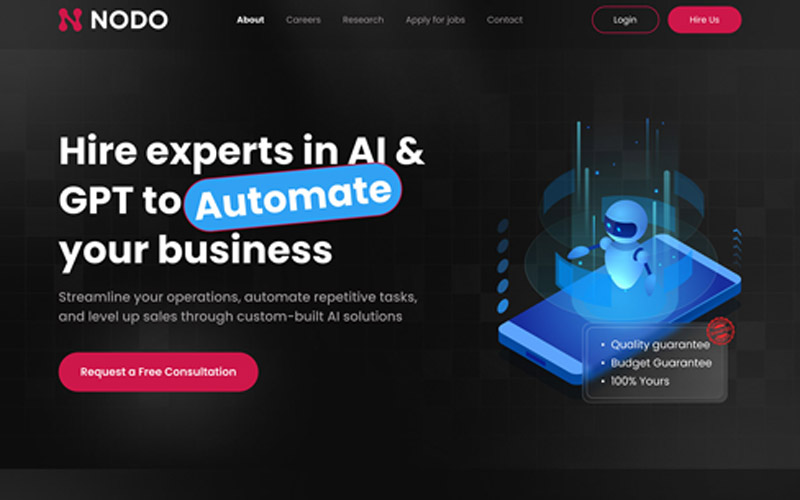
AI for Web Design
AI is also changing website design.
Modern AI-powered design tools can help generate:
- Website layouts
- Landing page concepts
- UI components
- Color schemes
- Navigation structures
- Content sections
- Responsive design ideas
A designer can provide information about a business and its target audience and use AI to generate possible layout directions.
For example, an e-commerce website might require:
- Header and navigation
- Hero section
- Product categories
- Featured products
- Product benefits
- Customer reviews
- Promotional section
- Footer
AI can help organize these elements into an initial layout.
The designer can then improve the user experience by considering usability, accessibility, responsive behavior, performance, and conversion goals.
AI for UX/UI Design
User experience design requires understanding how people interact with digital products.
AI can assist UX/UI designers by helping with:
- User flow ideas
- Wireframe concepts
- Interface variations
- Component suggestions
- Content organization
- Design-system ideas
- Accessibility checks
- Prototype concepts
For example, if a designer is developing an online shopping experience, AI can suggest possible user journeys from product discovery to checkout.
The designer still needs to validate these ideas with real users and business requirements.
AI can generate possibilities, but user research remains important.
AI Can Automate Repetitive Design Tasks
One of the most practical benefits of AI is automation.
Designers frequently perform repetitive tasks such as:
- Resizing images
- Removing backgrounds
- Renaming files
- Creating image variations
- Adjusting dimensions
- Cleaning images
- Applying similar edits
- Organizing visual assets
When these tasks are automated, designers can spend more time on creative and strategic work.
This is particularly valuable for agencies and businesses that handle large quantities of visual content.
AI Can Improve Image Quality
Some AI tools can enhance images by improving resolution, sharpness, noise reduction, or other visual characteristics.
This can be useful when working with:
- Old photographs
- Low-resolution product images
- Compressed images
- Small web images
- Images requiring enlargement
However, AI enhancement does not magically recover every missing detail. Excessive enhancement can sometimes create unnatural textures or artificial details.
Professional review is therefore important.
AI Can Help Designers Work Faster
Time is one of the most valuable resources in a design project.
A traditional workflow might require several hours to complete repetitive editing tasks.
AI can shorten parts of the process by providing automated assistance.
For example:
Traditional workflow:
Find image → manually select subject → remove background → clean edges → adjust image → export
AI-assisted workflow:
Upload image → AI identifies subject → automatic background removal → designer checks edges → refine → export
The second workflow can be significantly faster for suitable images.
The actual time savings depend on image complexity and the quality of the AI tool.
AI and Human Designers: A Better Combination
A common question is whether AI will replace designers.
AI can automate many technical and repetitive tasks, but design involves much more than producing an image.
Professional design requires:
- Creative thinking
- Visual communication
- Problem-solving
- Brand understanding
- Audience awareness
- Design principles
- Client communication
- Art direction
- Quality control
- Strategic thinking
AI can produce options, but humans decide which options are appropriate.
A useful workflow is:
Human idea → AI assistance → Human evaluation → Human refinement → Final design
This approach allows designers to use AI without losing creative control.
Benefits of Using AI Tools in Design
There are several important advantages to incorporating AI into a design workflow.
Faster Production
AI can automate time-consuming tasks and accelerate the creative process.
More Creative Exploration
Designers can quickly test different ideas and visual directions.
Reduced Repetitive Work
AI can handle certain repetitive production tasks, allowing designers to focus on more valuable work.
Scalable Content Production
Businesses can create and adapt large amounts of visual content more efficiently.
Easier Experimentation
Designers can test concepts before committing significant time to manual production.
Improved Workflow Efficiency
AI can connect different parts of the design process, from concept creation to editing and adaptation.
Limitations of AI Design Tools
Although AI provides many benefits, it also has limitations.
AI Can Make Mistakes
AI may misunderstand an image or create inaccurate visual details.
For example, generated product images may contain incorrect:
- Logos
- Text
- Product shapes
- Labels
- Buttons
- Fine details
For commercial product imagery, designers should carefully inspect AI-generated results.
AI May Produce Inconsistent Results
Generating the same character, product, or visual style consistently can sometimes be challenging.
Brand campaigns often require visual consistency across many assets.
Human art direction can help maintain consistency.
AI Does Not Understand Every Brand Requirement
A company may have detailed brand guidelines covering:
- Colors
- Typography
- Photography style
- Logo usage
- Spacing
- Tone
- Visual identity
AI may not automatically understand every requirement.
Designers must apply brand guidelines throughout the process.
AI-Generated Text Can Be Incorrect
Generative image systems have historically struggled with precise text rendering.
For designs containing important text, designers should verify and add the final typography using appropriate design software.
Copyright and Licensing Need Attention
AI-generated content can raise questions about copyright, licensing, training data, ownership, and commercial usage.
Businesses should review the terms of the specific AI service they use and understand how generated content can legally be used.
How Designers Can Use AI Effectively
Using AI effectively requires more than simply choosing an AI tool.
Start With a Clear Objective
Before using AI, define what you want to accomplish.
For example:
“I need five product banner concepts for a premium skincare brand.”
This is more useful than simply asking AI to “make a design.”
Give Specific Instructions
Better prompts generally contain relevant information about:
- Subject
- Style
- Audience
- Composition
- Lighting
- Colors
- Format
- Purpose
The more clearly you describe the design goal, the easier it is to evaluate the generated result.
Always Review the Output
Never assume an AI-generated result is automatically correct.
Check:
- Edges
- Product details
- Typography
- Proportions
- Colors
- Shadows
- Alignment
- Brand consistency
- Image quality
Refine Manually
Use AI for speed and human editing for precision.
A designer can correct mistakes and improve the final result using professional design software.
AI Design Workflow for Professional Designers
A practical AI-assisted workflow can look like this:
Step 1: Understand the Brief
Identify the business goal, target audience, platform, brand requirements, and deliverables.
Step 2: Generate Ideas
Use AI to explore possible concepts and creative directions.
Step 3: Select a Direction
Choose a concept that fits the project’s requirements.
Step 4: Create the Initial Design
Use AI-assisted tools to produce an initial visual.
Step 5: Refine the Design
Adjust composition, typography, colors, spacing, and visual elements.
Step 6: Check Quality
Inspect the design carefully for errors and inconsistencies.
Step 7: Optimize for the Platform
Create appropriate versions for desktop, mobile, social media, print, or e-commerce platforms.
Step 8: Export
Prepare the final files according to the required format and specifications.
This workflow combines automation with professional design judgment.
Best Practices for AI-Assisted Design
To get better results from AI design tools, follow these best practices:
Maintain Human Oversight
Always review AI-generated work before publishing.
Protect Brand Consistency
Use established brand colors, fonts, imagery, and guidelines.
Keep Original Assets Safe
Maintain backups of original images and project files.
Avoid Overediting
AI enhancement should improve an image rather than make it look artificial.
Check Commercial Usage
Understand the licensing terms of the AI tools and assets you use.
Prioritize Accuracy
For product photography, technical diagrams, medical visuals, financial information, or other sensitive content, accuracy should be carefully verified.
Will AI Replace Graphic Designers?
AI is likely to change many design jobs and workflows, particularly tasks involving repetitive production.
However, design is not simply image generation.
Businesses still need professionals who can understand a brief, communicate ideas, establish visual systems, solve design problems, and make strategic creative decisions.
As AI tools become more capable, designers may increasingly focus on higher-level responsibilities such as:
- Art direction
- Creative strategy
- Brand design
- User experience
- Visual storytelling
- Design systems
- Client communication
- Quality control
Learning how to use AI effectively can therefore become an important skill for modern designers.
How Businesses Can Use AI Design Tools
Businesses can use AI-assisted design to improve content production across many departments.
Marketing teams can use AI for campaign concepts and social media graphics.
E-commerce teams can use AI for product image editing and content adaptation.
Web teams can use AI for layout ideas and interface concepts.
Sales teams can use AI to create presentations and promotional materials.
Small businesses can use AI to explore professional-looking visual concepts without requiring a large design team.
However, professional review remains important when the visual content represents a company’s brand.
The Future of AI in Design
AI technology is likely to become increasingly integrated into creative software.
Future AI design workflows may provide more assistance with:
- Intelligent image editing
- Automated layout generation
- Personalized content
- Real-time design suggestions
- Responsive interface creation
- Automated asset adaptation
- Advanced product photography
- Video generation
- 3D design
- Design-system management
The role of the designer may gradually shift from manually performing every production task toward directing, evaluating, and refining AI-assisted workflows.
The most valuable skill may not be simply knowing how to use one particular AI tool. Instead, designers may benefit from learning how to combine AI with fundamental design principles.
Frequently Asked Questions About AI Design Tools
What are AI design tools?
AI design tools are software applications that use artificial intelligence to assist with creative tasks such as image generation, editing, background removal, layout creation, color selection, and content adaptation.
How can AI help graphic designers?
AI can help graphic designers generate ideas, automate repetitive tasks, edit images, create variations, remove backgrounds, enhance visuals, and explore different design directions.
Can AI create a complete website design?
AI can generate website layout concepts, UI ideas, and design structures. However, professional designers and developers are still needed to evaluate usability, accessibility, functionality, branding, and technical implementation.
Is AI useful for e-commerce image editing?
Yes. AI can assist with background removal, image cleanup, object removal, enhancement, resizing, and other product-image tasks. Human quality control remains important for accurate product presentation.
Can AI replace professional designers?
AI can automate some design tasks, especially repetitive production work, but professional design also involves strategy, creativity, communication, brand understanding, and decision-making. AI is often most useful as an assistant within a human-led workflow.
Are AI-generated images ready to use immediately?
Not always. AI-generated images may contain visual errors, incorrect details, inconsistent elements, or unwanted artifacts. Designers should review and refine them before using them commercially.
Should designers learn AI tools?
Learning AI-assisted design workflows can help designers improve productivity and explore new creative possibilities. AI skills can complement rather than replace fundamental design knowledge.
Conclusion
AI tools are transforming the design industry by making many creative and production tasks faster and more accessible.
From AI image generation and background removal to photo enhancement, website design, UX/UI concepts, color selection, and automated content adaptation, AI can support designers throughout the creative process.
The biggest advantage of AI is not simply that it can generate images. Its real value comes from helping designers save time, explore ideas, automate repetitive tasks, and focus more on creative problem-solving.
At the same time, AI has limitations. It can make mistakes, produce inconsistent results, misunderstand brand requirements, and create inaccurate details. For this reason, human creativity and quality control remain essential.
The most effective approach is to combine the strengths of both technologies:
AI provides speed and possibilities. Designers provide creativity, judgment, strategy, and precision.
As AI continues to develop, designers and businesses that learn how to integrate these tools into their existing workflows can create visual content more efficiently while maintaining professional standards.
Ultimately, AI should not be viewed simply as a replacement for traditional design. It is better understood as a powerful new tool that can help designers work smarter, experiment more freely, and spend more time creating meaningful visual experiences.